AI分块策略:这次怎么落地的
AI分块策略相关的坑,多半出在边界条件上。
最简单也最常见的分块方式,按固定字符数切分,加一点 overlap 避免上下文断裂:
第一版代码上线后,很快发现问题:句子经常在中间被切断。
为什么要分块
大模型的上下文窗口虽然越来越大(GPT-4 已经到了 128k),但在 RAG 场景下还是需要分块:
- 检索精准度:整个文档塞进去,向量检索会"稀释"关键信息
- 成本控制:上下文窗口越大,推理成本越高
- 信息密度:精准的小块更容易匹配用户查询
- 多文档场景:不同文档的信息需要独立处理
但分块也有问题:切得太碎会丢失上下文,切得太大会降低检索精度。这就是这次要解决的核心矛盾。
固定窗口分块
基础实现
最简单也最常见的分块方式,按固定字符数切分,加一点 overlap 避免上下文断裂:
def fixed_window_chunk(text, chunk_size=512, overlap=64):
    chunks = []
    start = 0

    while start < len(text):
        end = start + chunk_size
        chunk = text[start:end]
        chunks.append(chunk.strip())

        start = end - overlap
        if start >= len(text):
            break

    return chunks
踩坑一:句子被切断
第一版代码上线后,很快发现问题:句子经常在中间被切断。
# 问题示例
# ...用户反馈这个功能不够稳定,建议进一步优化。下个版本会...
#         ↑ chunk 结束位置,句子被截断
解决:在切分点寻找最近的句子边界。
import re

def sentence_aware_chunk(text, chunk_size=512, overlap=64):
    chunks = []
    start = 0

    while start < len(text):
        raw_end = start + chunk_size

        # 寻找最近的句子结束标记
        sentence_end = re.search(r'[。!?\n]\s*', text[raw_end:raw_end+100])
        if sentence_end:
            end = raw_end + sentence_end.end()
        else:
            end = raw_end

        chunk = text[start:end].strip()
        if chunk:
            chunks.append(chunk)

        start = end - overlap
        if start >= len(text):
            break

    return chunks
踩坑二:代码被破坏
技术文档里经常有代码块,固定窗口会把代码切成两半:
# 问题示例
```python
def hello():
    print("Hello, world"
    # ↑ chunk 结束位置,代码被破坏
**解决**:识别代码块边界,不在代码块内部切分。

```python
def code_aware_chunk(text, chunk_size=512, overlap=64):
    chunks = []
    start = 0
    in_code_block = False

    while start < len(text):
        # 检查当前位置是否在代码块中
        next_code_start = text.find('```', start)
        next_code_end = text.find('```', next_code_start + 3) if next_code_start != -1 else -1

        if in_code_block:
            # 当前在代码块中,找到结束位置
            if next_code_end != -1:
                chunk_end = next_code_end + 3
                in_code_block = False
            else:
                chunk_end = len(text)
        else:
            # 当前不在代码块中,正常切分
            if next_code_start != -1 and next_code_start < start + chunk_size:
                # 代码块在当前窗口内,停在代码块开始前
                chunk_end = next_code_start
                in_code_block = True
            else:
                # 正常寻找句子边界
                raw_end = min(start + chunk_size, len(text))
                sentence_end = re.search(r'[。!?\n]\s*', text[raw_end:raw_end+100])
                if sentence_end:
                    chunk_end = raw_end + sentence_end.end()
                else:
                    chunk_end = raw_end

        chunk = text[start:chunk_end].strip()
        if chunk:
            chunks.append(chunk)

        start = chunk_end - overlap
        if start >= len(text):
            break

    return chunks
踩坑三:表单和列表被打散
文档里的表单、列表经常被切得支离破碎:
## API 参数

| 参数 | 类型 | 说明 |
|------|------|------|
| name | string | 用户名称 |
| age | number | 用户年龄 |
| gender | string | 用户性别 |
# ↑ chunk 结束位置,表格被切断
解决:识别结构化内容边界,保持完整性。
def structure_aware_chunk(text, chunk_size=512, overlap=64):
    chunks = []
    start = 0

    # 定义结构化内容的开始和结束标记
    patterns = [
        (r'\|.*\|', r'\|.*\|'),  # 表格
        (r'^- ', r'^[^-]'),  # 列表
        (r'^\d+\. ', r'^[^\d]'),  # 数字列表
    ]

    while start < len(text):
        raw_end = start + chunk_size

        # 检查窗口内是否有结构化内容
        structure_end = None
        for start_pattern, end_pattern in patterns:
            structure_start = re.search(start_pattern, text[start:raw_end], re.MULTILINE)
            if structure_start:
                structure_match = re.search(end_pattern, text[raw_end:], re.MULTILINE)
                if structure_match:
                    structure_end = raw_end + structure_match.end()
                    break

        if structure_end:
            end = structure_end
        else:
            # 正常句子边界
            sentence_end = re.search(r'[。!?\n]\s*', text[raw_end:raw_end+100])
            if sentence_end:
                end = raw_end + sentence_end.end()
            else:
                end = raw_end

        chunk = text[start:end].strip()
        if chunk:
            chunks.append(chunk)

        start = end - overlap
        if start >= len(text):
            break

    return chunks
固定窗口的问题
虽然加了很多边界感知,但固定窗口还是有个根本问题:无法识别语义边界。
一段关于"用户认证"的内容可能延续 3 个 chunk,而关于"支付流程"的内容被挤在一个 chunk 里。检索时用户问"如何重置密码",可能同时匹配多个不相关的 chunk。
语义感知分块
基于段落语义的分块
思路是先用句子分割器切分成句子,再根据语义相似度聚合成 chunk:
from sentence_transformers import SentenceTransformer
from sklearn.cluster import AgglomerativeClustering

def semantic_chunk(text, max_chunk_size=512, min_chunk_size=256):
    # 初始化 embedding 模型
    model = SentenceTransformer('paraphrase-multilingual-MiniLM-L12-v2')

    # 分割句子
    sentences = re.split(r'[。!?\n]+', text)
    sentences = [s.strip() for s in sentences if s.strip()]

    # 计算句子 embedding
    embeddings = model.encode(sentences)

    # 层次聚类
    clustering = AgglomerativeClustering(
        n_clusters=None,
        distance_threshold=0.7,
        linkage='average'
    )
    labels = clustering.fit_predict(embeddings)

    # 聚合成 chunk
    chunks = []
    current_chunk = ""
    current_cluster = None

    for sentence, label in zip(sentences, labels):
        if label != current_cluster:
            if current_chunk.strip():
                chunks.append(current_chunk.strip())
            current_chunk = sentence
            current_cluster = label
        else:
            current_chunk += " " + sentence

        # 检查大小限制
        if len(current_chunk) > max_chunk_size:
            if current_chunk.strip():
                chunks.append(current_chunk.strip())
            current_chunk = ""

    if current_chunk.strip():
        chunks.append(current_chunk.strip())

    # 合并过小的 chunk
    merged_chunks = []
    for chunk in chunks:
        if merged_chunks and len(merged_chunks[-1]) + len(chunk) < max_chunk_size:
            merged_chunks[-1] += " " + chunk
        else:
            merged_chunks.append(chunk)

    return merged_chunks
踩坑一:语义模型开销大
这个方法效果确实不错,但问题也很明显:太慢了。
每处理一篇文档都要调用 embedding 模型,千字文档可能要几秒钟。批量处理文档时,这个开销会被放大。
解决:缓存和批处理。
from functools import lru_cache
import hashlib

@lru_cache(maxsize=1000)
def get_embedding(text):
    # 使用文本内容的哈希作为缓存键
    model = SentenceTransformer('paraphrase-multilingual-MiniLM-L12-v2')
    return model.encode(text)

def batch_semantic_chunk(texts, max_chunk_size=512, min_chunk_size=256):
    model = SentenceTransformer('paraphrase-multilingual-MiniLM-L12-v2')

    # 批量处理
    all_sentences = []
    sentence_indices = []

    for text_idx, text in enumerate(texts):
        sentences = re.split(r'[。!?\n]+', text)
        sentences = [s.strip() for s in sentences if s.strip()]
        all_sentences.extend(sentences)
        sentence_indices.extend([text_idx] * len(sentences))

    # 批量计算 embedding
    embeddings = model.encode(all_sentences, batch_size=32)

    # 后续聚类逻辑...
踩坑二:边界识别不稳定
语义边界有时候会"过度合并",把不太相关的内容放在一起;有时候又"过度切分",把本该在一起的内容分开。
# 问题示例
# chunk 1: 用户认证流程需要经过多个步骤...
# chunk 2: 首先,用户需要注册账号。然后验证邮箱...
# chunk 3: 完成验证后,用户可以登录系统。登录时...
# chunk 4: 支付流程需要先绑定银行卡...

# 用户问"如何注册",可能匹配 chunk 1-3
# 但 chunk 4 关于"支付流程"的内容被误匹配
解决:结合主题建模和语义距离。
def enhanced_semantic_chunk(text, max_chunk_size=512, min_chunk_size=256):
    model = SentenceTransformer('paraphrase-multilingual-MiniLM-L12-v2')

    # 分割句子
    sentences = re.split(r'[。!?\n]+', text)
    sentences = [s.strip() for s in sentences if s.strip()]

    # 计算句子 embedding
    embeddings = model.encode(sentences)

    # 计算句子之间的语义距离
    distances = []
    for i in range(len(embeddings) - 1):
        dist = 1 - np.dot(embeddings[i], embeddings[i+1])
        distances.append(dist)

    # 动态阈值:使用距离的平均值 + 标准差
    mean_dist = np.mean(distances)
    std_dist = np.std(distances)
    threshold = mean_dist + std_dist

    # 根据距离阈值切分
    chunks = []
    current_chunk = sentences[0]

    for i, (sentence, dist) in enumerate(zip(sentences[1:], distances)):
        if dist > threshold and len(current_chunk) > min_chunk_size:
            chunks.append(current_chunk.strip())
            current_chunk = sentence
        else:
            current_chunk += " " + sentence

        if len(current_chunk) > max_chunk_size:
            chunks.append(current_chunk.strip())
            current_chunk = ""

    if current_chunk.strip():
        chunks.append(current_chunk.strip())

    return chunks
踩坑三:跨文档关联丢失
语义分块在单个文档内效果很好,但跨文档的关联信息会丢失。比如"用户认证"在文档 A 中介绍,但"登录失败处理"在文档 B 中,检索时可能无法关联。
解决:引入跨文档引用和全局索引。
class CrossDocumentChunker:
    def __init__(self):
        self.global_index = {}
        self.document_map = {}

    def chunk_with_global_context(self, documents):
        all_chunks = []

        for doc_id, doc in enumerate(documents):
            chunks = self.enhanced_semantic_chunk(doc)
            self.document_map[doc_id] = chunks

            for chunk_idx, chunk in enumerate(chunks):
                # 提取关键词和实体
                keywords = self.extract_keywords(chunk)

                # 构建全局索引
                for keyword in keywords:
                    if keyword not in self.global_index:
                        self.global_index[keyword] = []
                    self.global_index[keyword].append({
                        'doc_id': doc_id,
                        'chunk_idx': chunk_idx,
                        'chunk': chunk
                    })

                all_chunks.append({
                    'content': chunk,
                    'doc_id': doc_id,
                    'chunk_idx': chunk_idx,
                    'keywords': keywords
                })

        return all_chunks

    def extract_keywords(self, text):
        # 简单的关键词提取
        import jieba
        import jieba.analyse

        keywords = jieba.analyse.extract_tags(text, topK=5)
        return keywords
混合分块策略
经过实践,发现没有一种"完美"的分块策略。不同场景需要不同方法。
按文档类型选择策略
这个思路的核心是根据文档特征自动选择最合适的分块方法:
class HybridChunker:
    def __init__(self):
        self.code_chunker = CodeAwareChunker()
        self.semantic_chunker = EnhancedSemanticChunker()
        self.fixed_chunker = FixedWindowChunker()

    def chunk(self, document, doc_type='auto'):
        # 自动检测文档类型
        if doc_type == 'auto':
            doc_type = self.detect_document_type(document)

        # 根据类型选择策略
        if doc_type == 'code':
            return self.code_chunker.chunk(document)
        elif doc_type == 'technical_doc':
            return self.semantic_chunker.chunk(document)
        elif doc_type == 'narrative':
            return self.fixed_chunker.chunk(document)
        else:
            # 默认使用语义分块
            return self.semantic_chunker.chunk(document)

    def detect_document_type(self, document):
        # 检测代码块比例
        code_block_ratio = len(re.findall(r'```', document)) / len(document)

        # 检测技术文档特征
        tech_keywords = ['API', '配置', '部署', '参数', '接口']
        tech_doc_ratio = sum(1 for kw in tech_keywords if kw in document) / len(tech_keywords)

        if code_block_ratio > 0.01:
            return 'code'
        elif tech_doc_ratio > 0.5:
            return 'technical_doc'
        else:
            return 'narrative'
分层分块
对于长文档,可以先用粗粒度分块,再对每个粗粒度块进行细粒度分块。这种结构既能保持大粒度的上下文关系,又能提升检索的精准度:
这样做有几个好处:
def hierarchical_chunk(text, primary_size=2048, secondary_size=512):
    # 第一层:大块分块
    primary_chunks = structure_aware_chunk(text, chunk_size=primary_size, overlap=128)

    # 第二层:对每个大块进行细粒度分块
    hierarchical_chunks = []
    for primary_idx, primary_chunk in enumerate(primary_chunks):
        secondary_chunks = enhanced_semantic_chunk(primary_chunk, max_chunk_size=secondary_size)
        for secondary_idx, secondary_chunk in enumerate(secondary_chunks):
            hierarchical_chunks.append({
                'content': secondary_chunk,
                'primary_id': primary_idx,
                'secondary_id': secondary_idx,
                'parent': primary_chunk  # 保留父块用于上下文补充
            })

    return hierarchical_chunks
实践总结
效果对比
在实际项目中的效果对比:
不同场景的建议
技术文档:优先语义感知 + 结构化边界识别
- 效果最好,能识别技术概念的完整性
- 成本可接受,技术文档通常不会太长
API 文档:优先代码感知 + 表格保护
- 代码块和表格完整性最重要
- 可以牺牲一点语义连续性
博客文章:固定窗口 + 句子边界就够了
- 成本低,效果够用
- 不需要过度工程化
法律文档:语义感知 + 段落保持
- 语义准确性比检索效率更重要
- 需要保留完整的法律条款
成本与收益
| 策略 | 处理时间 | 检索准确率 | 实施复杂度 |
|---|---|---|---|
| 固定窗口 | 1x | 65% | 低 |
| 句子感知 | 1.2x | 72% | 中 |
| 语义感知 | 3x | 81% | 高 |
| 混合策略 | 2.5x | 87% | 很高 |
检索准确率随策略复杂度稳步上升,但处理时间也在涨——混合策略虽然拿到 87%,成本是固定窗口的 2.5 倍。
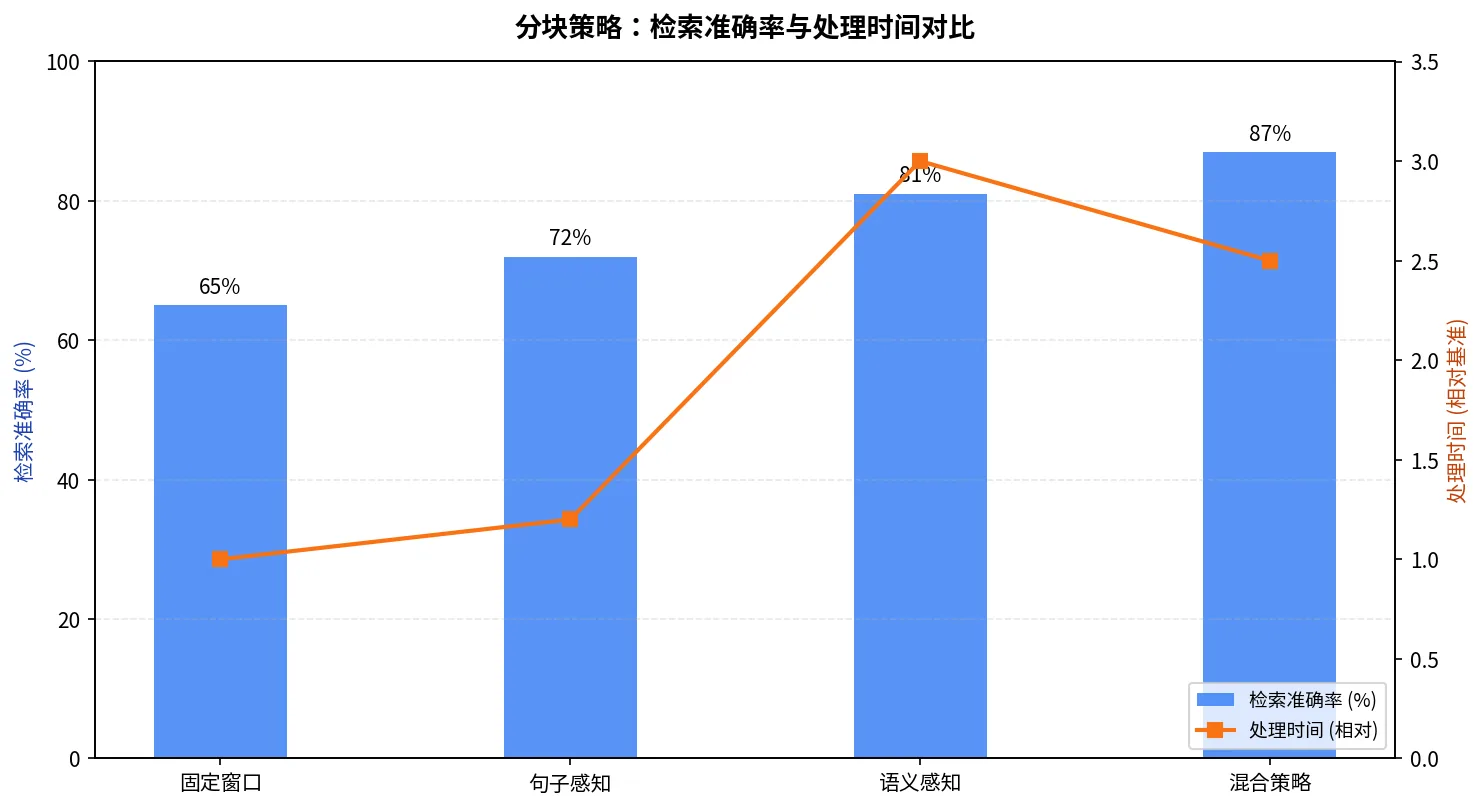
对我们这个项目来说,语义感知已经能把准确率拉到 81%,混合策略的额外 6 个点是否值得 2.5x 的处理开销,需要按文档量和 QPS 预算再评估。
踩过的总结
这次分块策略的折腾,踩过的坑远不止这些:
- 过度优化:一开始想追求"完美分块",结果复杂度爆炸,维护成本太高
- 语义漂移:长文档的语义边界很难识别,容易"漂移"
- 多语言问题:中英文混排时,边界识别会出问题
- 实时处理:需要实时分块时,语义模型的延迟会成为瓶颈
最后还是回到了实用主义:先解决 80% 的问题,再优化剩下的 20%。
写在最后
分块策略这东西,说简单也简单,说复杂也复杂。简单到几行代码就能实现,复杂到需要考虑语义、结构、上下文、成本等多个维度。
这次实践最大的收获是:不要迷信"最优解"。不同的场景需要不同的策略,关键是理解自己的需求是什么,限制条件是什么。
如果你的 RAG 系统还在用简单的固定窗口分块,不妨先加个句子边界感知,成本不高,收益明显。如果你的文档主要是技术内容,语义感知值得试试,虽然成本高点,但效果提升明显。
但如果你只是想快速上线一个原型,别一开始就搞复杂的混合策略。先跑起来,再根据实际情况优化。
这次分块策略的实践花了两个多月,从最简单的固定窗口到复杂的混合策略。虽然踩了不少坑,但总算找到了一些可落地的实践。现在公司的 RAG 系统检索准确率从 65% 提升到了 87%,虽然离"完美"还有距离,但已经足够用了。
版权声明: 本文首发于 指尖魔法屋-AI分块策略:这次怎么落地的(https://blog.thinkmoon.cn/post/365-ai-chunking-strategy-document-chunk-practice/) 转载或引用必须申明原指尖魔法屋来源及源地址!
评论
使用 GitHub 账号登录后即可留言,支持 Markdown。